

Google Generative AI Performance Reports: 5 Game-Changing Ways to Master AEO & GEO in 2026
Introduction: The Dawn of a New Search Era
The landscape of digital visibility is undergoing its most significant transformation since the invention of the hyperlink. Today, Google has officially bridged the gap between traditional search and the future by launching the Google Generative AI Performance Reports in Search Console. For website owners, marketers, and SEO professionals, this isn’t just another update—it’s the ultimate compass for navigating the brave new world of Answer Engine Optimization (AEO) and Generative Engine Optimization (GEO).
As AI Overviews and AI Mode become central to how users consume information, the traditional metrics of clicks and rankings are evolving. The new Google Generative AI Performance Reports provide the granular data needed to understand how your content is being synthesized and presented by Google’s advanced LLMs. Whether you are a small business owner or a digital marketing veteran, mastering these reports is now a prerequisite for staying relevant in 2026.
What are Google Generative AI Performance Reports?
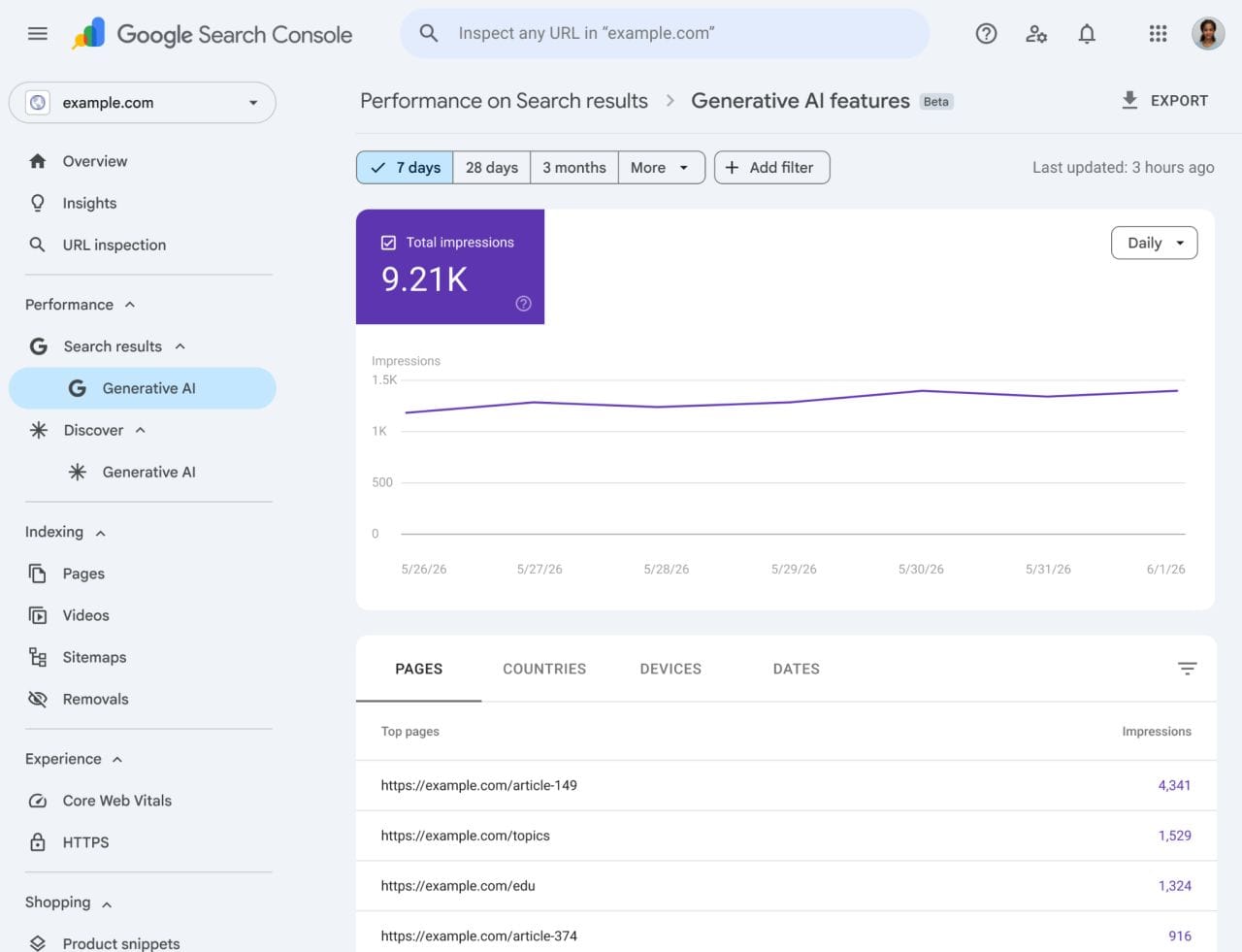
Announced on June 3, 2026, the Google Generative AI Performance Reports are dedicated views within Google Search Console designed to track your site’s visibility across generative AI features. These features include AI Overviews (formerly SGE), the dedicated AI Mode in Search, and generative AI elements within the Discover feed.
Previously, AI-driven impressions were bundled into general search data, making it difficult to isolate the impact of generative features on organic traffic. With this rollout, Google is providing a separate, transparent lens through which we can view how often our URLs are cited as sources in AI-generated responses.
Key Features: What Data Can You Track?
The Google Generative AI Performance Reports offer a comprehensive breakdown of metrics that go beyond simple page views. Here is what you can expect to see in your dashboard:
| Metric | Description | Strategic Value |
| Impressions | Total count of times your URLs appeared in AI Overviews or AI Mode. | Measures brand awareness in the AI ecosystem. |
| Pages | Specific URLs that were used as citations or sources. | Identifies which content is “AI-friendly.” |
| Countries | Geographic breakdown of where your AI citations are appearing. | Helps in localizing GEO strategies. |
| Devices | Data on mobile vs. desktop visibility in AI features. | Guides technical optimization for different platforms. |
| Dates | Hourly to monthly performance tracking. | Helps correlate content updates with AI visibility. |
Why This Matters for AEO and GEO Optimization
To truly benefit from the Google Generative AI Performance Reports, one must understand the shift from SEO to AEO and GEO.
- AEO (Answer Engine Optimization): Focuses on providing direct, concise answers to specific user queries. The goal is to be the primary source for the “answer” that the AI provides.
- GEO (Generative Engine Optimization): A broader strategy that involves optimizing content so that LLMs (like Gemini) include your brand, products, or insights in their synthesized responses.
These reports act as a feedback loop. If your Google Generative AI Performance Reports show high impressions but low click-through rates (CTR) from specific pages, it may indicate that while your content is “AI-readable,” it might not be compelling enough for users to click through for deeper reading. Conversely, if certain pages are never appearing in these reports, they likely lack the structural clarity or authoritative signals required for AI synthesis.
5 Strategic Ways to Use These Reports for Growth
Mastering the Google Generative AI Performance Reports requires a data-driven approach. Here are five game-changing strategies to implement today:
1. Identify “Citation Winners”
Use the “Pages” report to see which of your articles are most frequently cited. Analyze these pages for common traits—are they using clear headings? Do they have bulleted lists? Replicate these structural elements across your site to boost overall GEO performance.
2. Monitor AI-Driven Volatility
Generative AI responses can change overnight. By tracking “Dates,” you can see if a core update or a change in Google’s LLM model has impacted your visibility. This allows for rapid content pivoting.
3. Optimize for Device-Specific AI
The “Devices” metric is crucial. AI Overviews often look different on mobile than on desktop. Use the Google Generative AI Performance Reports to ensure your most important citations are appearing where your audience is most active.
4. Bridge the Gap Between Discover and Search
Since the reports include Discover data, you can see how AI-curated content is performing. This is a massive opportunity for lifestyle and news sites to understand how AI is “recommending” their content to users before they even search.
5. Validate Your EEAT Strategy
AI models prioritize authoritative, trustworthy sources. If your Google Generative AI Performance Reports show steady growth, it’s a strong signal that Google views your site as an expert in its niche.
The Future of EEAT in the Age of Generative AI
Experience, Expertise, Authoritativeness, and Trustworthiness (EEAT) are no longer just “nice-to-haves.” In the era of the Google Generative AI Performance Reports, they are the bedrock of visibility. Google’s generative models are trained to avoid hallucinations by citing high-authority sources.
To improve your EEAT for AI:
- Author Bylines: Ensure every piece of content is attributed to a real person with verifiable credentials.
- First-Hand Experience: AI loves “I tried this” or “In our testing” statements.
- Fact-Checking: Use external links to reputable sources like Search Engine Journal to back up your claims.
At CoreBrief, we keeping you updated on critical policy changes-like Google’s new Buy Button rule for out-of-stock products to ensure your brand stands out in the AI era.
Frequently Asked Questions (FAQs)
How do I access the Google Generative AI Performance Reports?
You can find these reports by logging into your Google Search Console account. Navigate to the “Performance” section in the left-hand sidebar. If you are part of the initial rollout, you will see a new tab labeled “Generative AI” under the Search and Discover categories.
Does appearing in AI Overviews help or hurt my organic traffic?
While AI Overviews can lead to “zero-click” searches, appearing as a cited source in the Google Generative AI Performance Reports is generally positive. It establishes your brand as an authority and provides a direct link for users who want to dive deeper into the topic, often leading to higher-quality traffic.
What is the difference between AEO and GEO?
AEO (Answer Engine Optimization) is the practice of optimizing content to provide direct, factual answers to specific questions. GEO (Generative Engine Optimization) is a broader strategy aimed at ensuring your content is used by LLMs to synthesize comprehensive responses, even when a direct question isn’t asked.
Why are my URLs not appearing in the Generative AI reports?
If your site isn’t showing up in the Google Generative AI Performance Reports, it may be due to a lack of structural clarity (like schema markup), low EEAT signals, or content that is too broad. Focus on creating high-quality, expert-led content that answers specific user intents.
Can I opt-out of being included in Google’s Generative AI features?
Google allows site owners to use the nosnippet or max-snippet robots tags to control how their content appears. However, opting out completely may significantly reduce your visibility as generative features become the default search experience for many users.
Will these reports show the specific queries that triggered the AI Overview?
Currently, the Google Generative AI Performance Reports focus on impressions, pages, countries, and devices. While specific query-level data for AI features is limited, Google has hinted at adding more granular metrics in future updates.
Conclusion: Adapting to the Generative Shift
The launch of the Google Generative AI Performance Reports marks a milestone in the evolution of the web. We are moving away from a world of “10 blue links” and into a world of synthesized, AI-driven answers. By leveraging the data in these new reports, you can stop guessing and start optimizing with precision.