
Meta Ads Updates 2026: 2 Big Changes Every Marketer Must Know Now
Meta is not slowing down. The latest Meta Ads updates 2026 have landed inside Ads Manager, and they are already changing how brands reach their audiences and drive conversions on Facebook and Instagram. These are not small tweaks or cosmetic changes. They represent a direct shift in how Meta wants advertisers to think about targeting and traffic.
This blog breaks both Meta Ads updates 2026 down clearly, explains the real-world impact for your campaigns, and gives you a step-by-step path to take action today.
Maximise Instagram Profile and Facebook Page Visits
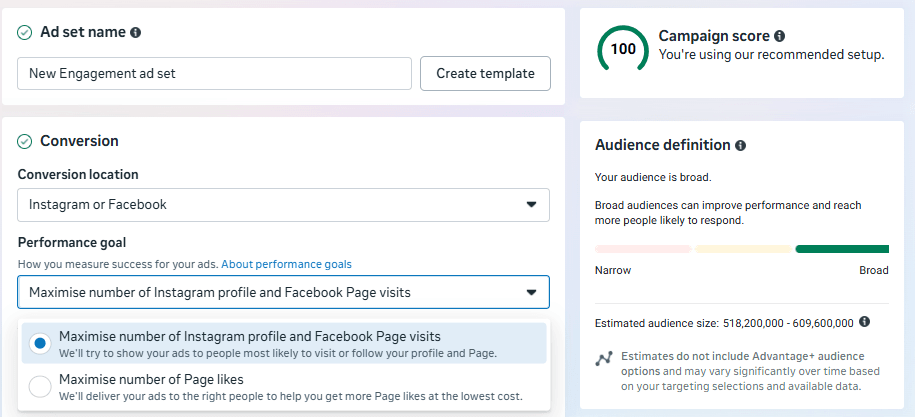
Meta has added a new performance goal inside Ads Manager called Maximise Number of Instagram Profile and Facebook Page Visits. This goal is available under the Engagement campaign objective and is built to send high-intent traffic directly to your social profiles rather than to an external website or landing page.
What This Performance Goal Does
When you select this goal, Meta’s ad delivery system works to show your ad to users who are most likely to click through and visit your Instagram profile or Facebook page. The algorithm relies on behavioural patterns across the platform to identify users who have historically visited and engaged with brand profiles in categories similar to yours.
This is a meaningful shift because it gives profile-first brands a proper campaign objective that matches their actual business model. Until now, advertisers who relied on profile engagement for sales had to use workarounds. This goal removes that friction entirely.
Your Instagram profile or Facebook page is your most powerful digital storefront. It holds your content, your reviews, your products, and your brand story all in one place. Sending paid traffic there converts differently from sending it to a cold landing page.
Why Profile Visits Lead to Real Conversions
A profile visit is not a passive event. When a high-intent user lands on your Instagram or Facebook profile after seeing your ad, a series of downstream actions become significantly more likely:
- Direct Message enquiries from users who want to know more or buy.
- Link clicks from your bio leading to your website or product catalogue.
- Browsing your feed posts, reels, and highlighted stories.
- Following your account, which builds a warm audience for future organic and paid reach.
- Trust built instantly through visible social proof, reviews, and consistent content.
For any brand that converts primarily through Instagram DMs, Facebook enquiries, or social-first product discovery, this goal directly targets the behaviour that produces a sale. It removes the cold landing page from the equation and lets your existing content do the conversion work.
Which Brands Should Use This Goal
- E-commerce brands using Instagram Shop or Facebook Catalogue as a primary sales channel.
- Service businesses where DM enquiries are the main lead source.
- Creators and personal brands building an engaged audience before monetising.
- Local businesses that use a Facebook Page as their primary digital presence.
- Any brand where social proof and profile content are central to the purchase decision.
How to Set It Up in Ads Manager
Open Meta Ads Manager and create a new Engagement campaign. At the Ad Set level, set your Conversion Location to Instagram or Facebook. Then select Maximise number of Instagram profile and Facebook Page visits as your Performance Goal. From there, define your audience, set your budget, and upload your creative as normal. For best results, use Advantage+ Audience alongside this goal so Meta’s AI can find the most relevant users.
Describe Your Audience with Advantage+ AI Targeting
The second update is the more transformative of the two, particularly for advertisers who have spent years wrestling with Meta’s interest-targeting interface. Meta has introduced a natural language text box inside Advantage+ Targeting called Describe Your Audience. Instead of manually selecting interest categories from a dropdown, you simply write a plain-text description of your ideal customer and Meta’s AI does the rest.
Why Manual Interest Targeting Is Losing Its Edge
The traditional method of building a Meta audience involved stacking interest categories, demographic filters, and behavioural signals inside the Detailed Targeting section. This approach was time-consuming, required deep platform knowledge, and was increasingly being overridden by Meta’s own algorithm anyway.
In 2026, Meta’s ad delivery system treats manual interest inputs as suggestions rather than strict rules. The platform’s AI has enough behavioural data to find relevant users on its own. The old method of building elaborate interest stacks is becoming less effective and more effort than it is worth.
In 2026, winning on Meta is no longer about knowing which interest categories to stack. It is about giving the AI a clear picture of who your customer is and letting the system find them across its network of over three billion users.
How the Describe Your Audience Feature Works
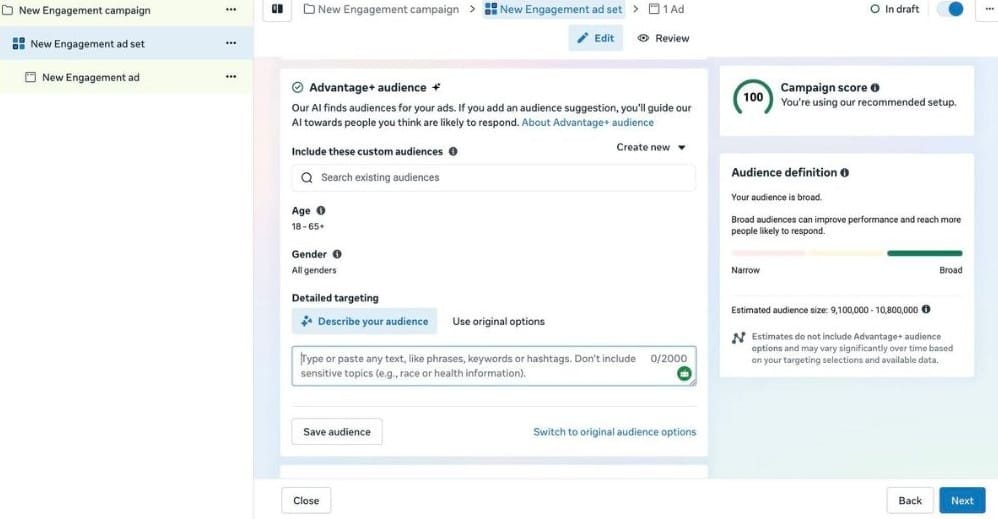
Inside the Detailed Targeting section of your Ad Set, you will now see two tabs. The first is Describe your audience and the second is Use original options. The new tab presents a text box that accepts up to 2,000 characters. You can type phrases, keywords, hashtags, or descriptive sentences about the person you want to reach.
Meta’s AI reads your description, cross-references it with its own behavioural and interest data, and builds a working audience that matches your profile. You do not need to know the exact category names or interest labels. You just need to know your customer.
For example, a handmade textiles brand in India might write: Women aged 25 to 45 who love sustainable fashion, handloom sarees, and Indian artisan crafts. They follow accounts related to slow fashion, block printing, and eco-friendly living. They shop online and value authenticity over fast fashion. The AI translates this description into a precise, scalable audience without any dropdown selections required.
What the AI Optimises For
When you use the Describe Your Audience feature, Meta’s system works to deliver your ad to people who show the following patterns:
- High purchase intent based on recent browsing and engagement behaviour.
- Similarity to your existing best customers if your Pixel or Conversions API has enough data.
- Interest signals that match the language and topics in your description.
- Broader reach than manual targeting, finding relevant users that interest stacks would miss.
- Lower cost per result over time, as the algorithm learns and refines the audience.
What You Cannot Include
Meta’s platform policy does not permit audience descriptions that reference race, religion, health conditions, political beliefs, or any other protected characteristics. Stick to lifestyle traits, purchasing behaviours, interests, professional context, and relevant platforms or content types when writing your description.
Old Method vs New AI Method at a Glance
| Aspect | Manual Interest Targeting | Describe Your Audience AI |
| Setup time | 30 to 60 minutes | Under 5 minutes |
| Input method | Dropdown category selection | Plain-text description |
| Flexibility | Limited to listed interest labels | Any descriptive language |
| AI expansion | Optional, often unpredictable | Built in and automatic |
| Skill required | Deep platform knowledge | Knowledge of your own customer |
| Best for | Niche campaigns with known audiences | Scaling and broad discovery campaigns |
How Both Updates Work Together in One Campaign
These two updates are most powerful when combined inside a single campaign. Here is a simple workflow that puts both to work immediately:
- Open Ads Manager and create a new Engagement campaign.
- At the Ad Set level, set your Conversion Location to Instagram or Facebook.
- Select Maximise number of Instagram profile and Facebook Page visits as your Performance Goal.
- In the Targeting section, click Describe your audience and write a detailed, honest description of your ideal customer.
- Upload three to five creative variants so the algorithm has enough variety to learn from.
- Set a realistic daily budget and let the campaign run for at least seven days without making adjustments.
- After the learning phase, review your profile visit cost, downstream DM volume, and follower growth.
This combination removes the need for expensive external landing pages, uses your existing social content as a live conversion tool, and puts Meta’s full AI capability to work finding the right people for your profile.
The brands winning with Meta Ads in 2026 are not the ones with the most complex targeting setups. They are the ones who feed the algorithm clean signals, great creative, and a clear goal.
What These Updates Signal About Meta’s Direction in 2026
Both updates are part of a clear pattern. Meta is consolidating its entire advertising system around AI-led automation. Manual controls are being reduced. Strategic inputs, meaning strong creative, clear audience descriptions, and clean first-party data from your Pixel or Conversions API, are becoming the primary levers advertisers can pull.
This is consistent with what is happening across every major paid platform. Google Ads is doing the same with Performance Max. TikTok has done it with Smart Plus campaigns. Meta’s message is the same across all of them. Define your goal clearly, provide quality creative, and trust the system to find the right people.
For advertisers, this means the skill set is shifting. Knowing which interest categories to stack matters less than it used to. What matters now is understanding your customer deeply enough to describe them clearly, and having a social profile strong enough to convert the traffic that arrives.
To understand how AI tools are reshaping digital marketing beyond just Meta, read our full guide on the Top AI Digital Marketing Tools for 2026. It covers the full stack of tools that work alongside platforms like Meta to help you run smarter campaigns.
Final Conclusion
Meta Ads in 2026 has changed in ways that matter. The Maximise Instagram Profile and Facebook Page Visits performance goal gives profile-first brands a proper campaign objective that matches how they actually convert customers. The Describe Your Audience feature removes the complexity of manual targeting and replaces it with something far more intuitive and effective.
Together, these two updates lower the barrier to running effective Meta campaigns while simultaneously raising the ceiling on what is possible when the AI has clean inputs to work with.
The best move right now is to test both features with a small, focused campaign. Write a genuine audience description. Point the traffic at a well-prepared profile. Give the algorithm seven days to learn. The results will tell you everything you need to know about whether to scale.
The shift is already happening. The advertisers who adapt early will have a clear advantage over those still relying on methods that Meta is quietly moving away from.
If you are building out your full social media management workflow alongside your Meta Ads strategy, check out our breakdown of the Best Platform Tools for Managing Social Media Marketing in 2026. It covers the tools that help you manage, schedule, and analyse across every major platform from one place.
Frequently Asked Questions (FAQ)
Is the Maximise Profile Visits goal available to all Meta advertisers right now?
Meta is rolling this feature out progressively across accounts. If you do not see it yet under your Engagement campaign objectives, check back over the coming weeks. Global rollouts on Meta typically take several weeks to reach all account types and regions.
Does Describe Your Audience replace manual interest targeting completely?
No. You can still use the original interest targeting options by clicking Use original options inside the Detailed Targeting section. The Describe to Your Audience text box is an alternative path designed for the Advantage+ era. It is not a forced replacement, but it is the direction Meta is actively encouraging advertisers to move toward.
What creative works best with the profile visit goal?
Short-form, reel video content tends to perform best because it communicates your brand quickly and creates curiosity that drives a profile click. Reels-style 9:16 vertical video with a clear hook in the first two seconds, followed by a soft call to action (CTR) like Check our profile or See our full collection, consistently outperforms static images for this specific goal.
Can small businesses with limited budgets benefit from these updates?
Yes. Both features are particularly well-suited to smaller budgets because they reduce wasted spend. AI targeting avoids showing your ad to irrelevant users, and the profile visit goal focuses spend on people already showing intent. A daily budget of 300 to 500 Indian Rupees is enough to start gathering meaningful data.
What should my Instagram or Facebook profile look like before I run profile visit ads?
Your profile needs to be conversion-ready before you pay to send traffic to it. At minimum, make sure you have a clear bio with a website link, a consistent and professional feed, pinned story highlights that answer common questions, and visible social proof such as reviews, testimonials, or user-generated content. A weak profile will waste your ad budget.
Disclaimer
This article is written for informational and educational purposes only. The features described are based on observed updates inside Meta Ads Manager as available in 2026. Feature availability may vary by region, account type, and campaign objective. Meta continues to roll out updates on a staggered basis, so some options may not yet be visible in all accounts at the time of reading.
This content does not constitute professional advertising, financial, or legal advice. Always review Meta’s current Help Centre documentation and consult a certified Meta Business Partner before making significant changes to your advertising strategy.
All trademarks, product names, and company names mentioned in this article belong to their respective owners. This site is not affiliated with or endorsed by Meta Platforms, Inc.