
Meta Customer Lifecycle Strategy: 7 Powerful Ways to Cut Wasted Ad Spend in 2026
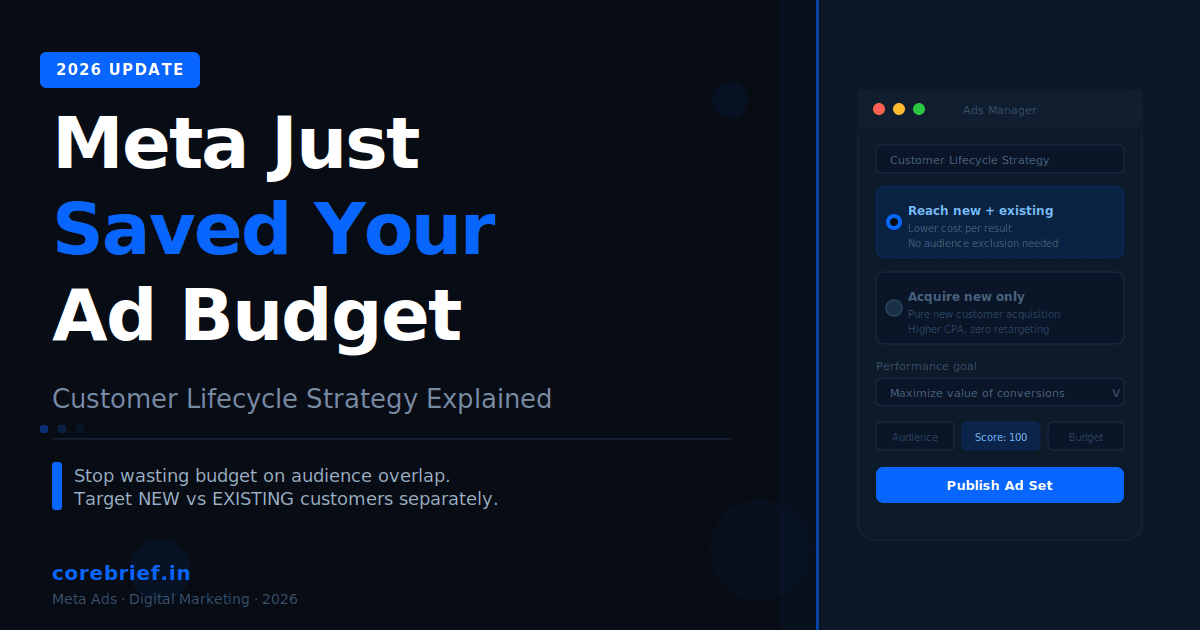
Meta Customer Lifecycle Strategy is a new ad set level feature inside Meta Ads Manager that lets advertisers choose who their ads reach based on purchase history. With Meta Customer Lifecycle Strategy, you can tell Meta to target only brand new customers, or reach both new and existing customers, all from a single campaign setup.
This feature rolled out in early 2026 for manual Sales campaigns. It has not reached all ad accounts yet, but is expanding gradually.
The Problem Meta Customer Lifecycle Strategy Solves
Before this update, running separate campaigns for different stages of the customer funnel required real effort. If you wanted to show one ad to cold audiences and a different message to past buyers, you had to create multiple ad sets or multiple campaigns. Each one had its own budget, its own delivery algorithm, and its own audience targeting.
The catch was audience overlap. Meta’s algorithm does not always respect your audience exclusions the way you expect. Cold and warm audiences would bleed into each other. You would pay for the same person twice. Your frequency would spike on retargeting audiences while prospecting campaigns starved.
The result: wasted budget, confused attribution, and an ad account that was harder to manage than it needed to be.
How Meta Customer Lifecycle Targeting Works
The Meta Customer Lifecycle Strategy setting appears at the ad set level in manual Sales campaigns.
You will see it just below the ad set name field, under a section labeled customer lifecycle targeting.
From there, a dropdown menu gives you two options. Meta uses your pixel data, Conversions API signals, and purchase history to enforce whichever option you select.
The performance goal in the same screen is set to Maximize value of conversions by default, meaning Meta is not just counting conversions. It is weighing their revenue value, which works especially well for e-commerce businesses with purchase events set up.
The Two Meta lifecycle ads feature Options Explained
Option 1: Reach New and Existing Customers (Meta Customer Lifecycle Strategy Default)
This is the default Meta Customer Lifecycle Strategy setting.
Choose this if your goal is to get conversions at the lowest possible cost. Meta’s algorithm will optimise across both new and existing customers, finding whoever is most likely to convert at the cheapest cost per result.
This works well for broad sales campaigns, limited-time offers, and situations where you want maximum conversion volume regardless of whether the buyer is new or returning.
Option 2: Acquire New Customers Only (Meta Customer Lifecycle Strategy Growth Mode)
Choose this Meta lifecycle ads feature option when first-time buyers are more valuable to your business right now.
Meta will focus your entire budget on people who have never purchased from you before. No retargeting. No budget leaking toward repeat buyers who might have purchased anyway.
Meta’s own interface warns that this setting may increase your cost per result, since the algorithm is working from a smaller pool. However, every conversion generated is a net new customer, which increases your true customer acquisition count.
Early adopters of the Meta Customer Lifecycle Strategy have reported significant CPA improvements when this setting is paired with strong Conversions API data.
Why Meta lifecycle ads feature Saves Your Budget
The Meta Customer Life cycle Strategy feature improves budget efficiency in three concrete ways.
It reduces audience overlap. Meta manages the segmentation natively, so your prospecting and retargeting budgets are no longer competing for the same users.
It gives the algorithm a cleaner signal. When you define your goal clearly inside the Meta Customer Lifecycle Strategy setting, Meta’s delivery system can optimise more precisely. Vague objectives lead to vague results.
It removes the manual exclusion overhead. Manually maintained custom audience exclusions go stale. The Meta Customer Lifecycle Strategy handles this automatically, using your pixel and Conversions API data in real time.
Who Should Use Each Meta Customer Life cycle Strategy Setting?
| Business Situation | Best Meta Customer Life cycle Strategy Setting |
|---|---|
| New product launch | Acquire new customers only |
| Broad seasonal sale | Reach new and existing customers |
| Scaling an e-commerce brand | Acquire new customers only |
| Flash sale for all users | Reach new and existing customers |
| Subscription service in growth phase | Acquire new customers only |
| Low budget, maximum conversions needed | Reach new and existing customers |
| Strong LTV and repeat buyer base | Acquire new customers only |
How to Set Up Meta Customer Lifecycle Strategy (Step by Step)
Follow these steps to activate the Meta Customer Lifecycle Strategy feature in your account.
- Step 1. Open Meta Ads Manager and start a new campaign, or open an existing Sales campaign.
- Step 2. Navigate to the Ad Set level.
- Step 3. Look for the Customer Life cycle Strategy section below the ad set name field.
- Step 4. Select your preferred option from the dropdown. If the feature is not visible yet, it has not rolled out to your account.
- Step 5. Set your Performance Goal. Maximize value of conversions is the recommended default for e-commerce.
- Step 6. Make sure your Meta Pixel and Conversions API are set up correctly. The Meta Customer Life cycle Strategy relies on purchase event data to identify existing customers accurately. Without clean data, the segmentation will not work as intended.
- Step 7. Publish your ad set and monitor results. Give it at least 7 days before drawing conclusions, as the learning phase needs data to stabilise.
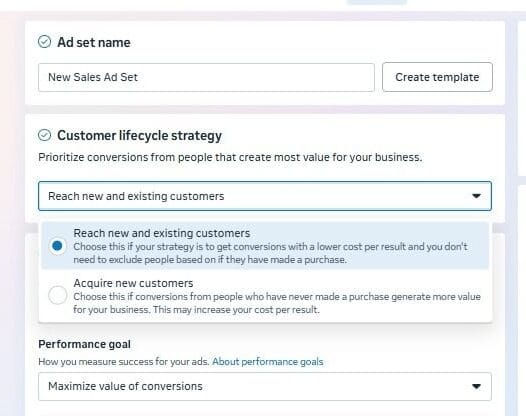
How to set up Meta Customer Life cycle Strategy in Ads Manager
Frequently Asked Questions (FAQs)
What is Meta Customer Lifecycle Strategy?
Meta Customer Lifecycle Strategy is a new ad set level setting in Meta Ads Manager that lets advertisers choose between targeting only new customers or reaching both new and existing customers within the same campaign.
Does Meta Customer Lifecycle Strategy reduce audience overlap?
Yes. Because Meta Customer Lifecycle Strategy handles the segmentation at the platform level, the risk of your prospecting and retargeting audiences competing for the same users is significantly reduced.
Is Meta Customer Lifecycle Strategy available to all advertisers?
Not yet. Meta is rolling out the Meta Customer Lifecycle Strategy gradually. If you do not see it in your Ads Manager, check back in the coming weeks.
What performance goal should I use with Meta Customer Lifecycle Strategy?
Maximize value of conversions is the strongest default for most e-commerce use cases. It requires purchase values to be set up in your pixel or Conversions API.
Do I need separate campaigns after using Meta Customer Lifecycle Strategy?
In many cases, no. The Meta Customer Lifecycle Strategy handles the lifecycle segmentation logic, reducing the need for separate prospecting and retargeting campaign structures.
Does Meta Customer Lifecycle Strategy work with Advantage+ campaigns?
Currently, Meta Customer Lifecycle Strategy is available for manual Sales campaigns. Advantage+ campaigns use their own automation logic. Check your Ads Manager for the latest availability.
Final Thoughts on Meta Customer Lifecycle Strategy
The Meta Customer Lifecycle Strategy is one of the more practical updates Meta has shipped in recent years.
It does not replace good creative. It does not fix a weak offer. But it removes one expensive layer of friction from your ad account, and that is worth acting on.
If the Meta Customer Lifecycle Strategy is live in your account, test it on your next sales campaign. If it is not visible yet, save this guide and come back when it appears.
Disclaimer: This blog is based on observations from Meta Ads Manager and reports from early adopters. The Customer Lifecycle Strategy feature is still rolling out and may not be available in all ad accounts.CoreBrief is not affiliated with Meta Platforms, Inc. Feature availability and behavior may change without notice.